How to Back Up and Export WhatsApp Group Members
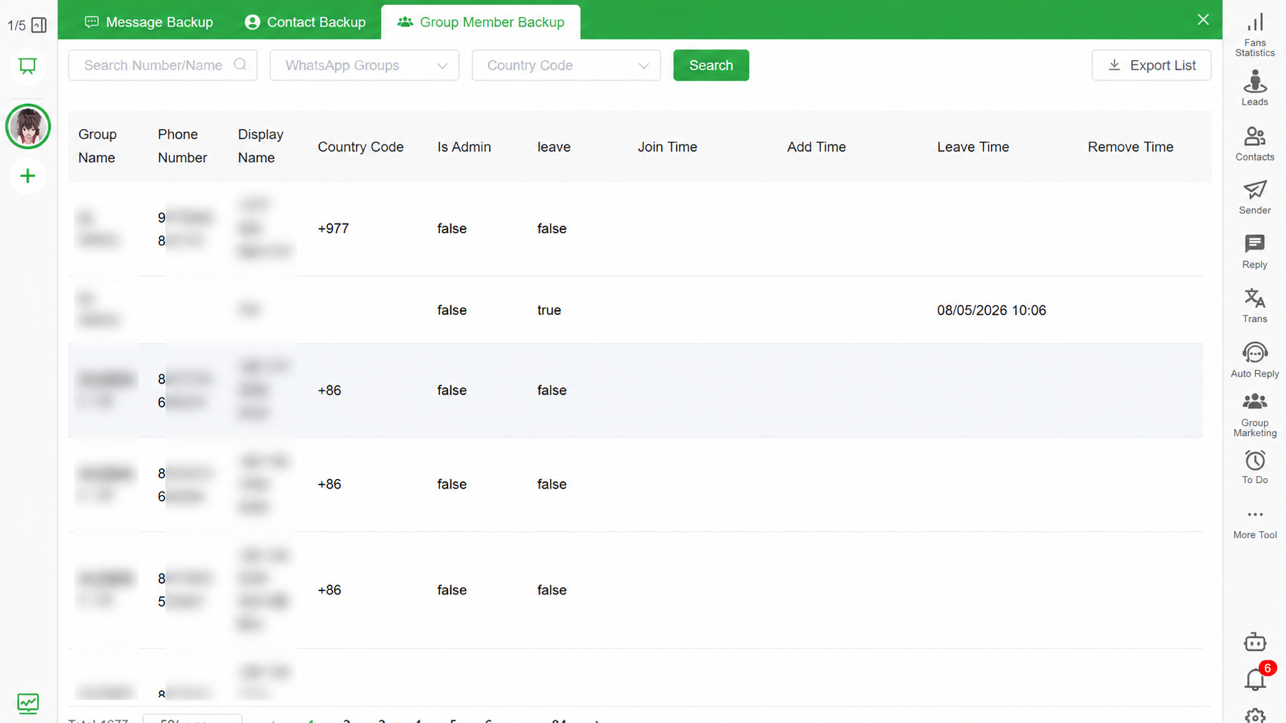
To back up WhatsApp group members, first confirm that you are authorized to manage the group and retain its member records. Use Bakvio Group Member Backup to save available group names, member numbers, nicknames, country codes, admin status and supported membership events locally. Search the archive, verify the fields, then export approved records to Excel or CSV.
Quick answer: Install Bakvio on Windows or macOS, connect a WhatsApp account you control, open Group Member Backup, select the managed groups in scope, complete the local backup and verify representative members before exporting. Use the data only for the approved administrative purpose.
Why group-member backup is different from chat export
A native WhatsApp chat export preserves conversation history. It may show names or numbers for people who participated, but it is not a complete structured member register. Silent members may not appear in the message text, and admin or membership-event fields are not organized for business review.
Group Member Backup is designed around group records rather than message rows. It is useful for:
- Handing over administration of a customer or community group.
- Verifying which managed group a member belongs to.
- Preserving available admin status.
- Reviewing supported join, leave or removal information.
- Keeping an approved local record before an account or device change.
- Exporting structured fields for authorized reconciliation.
It should not be used to collect unsolicited sales leads or bypass consent requirements.
What Bakvio can preserve
Availability depends on the connected account and the data accessible during backup. Supported records can include:
- Group name.
- Member phone number.
- Available nickname or display name.
- Country code.
- Connected WhatsApp account.
- Admin status.
- Available join time.
- Available leave time.
- Available removal time.
Not every row will contain every field. Older events may be unavailable, and the account may not expose all historical information. Treat blank fields as unavailable data, not proof that an event never occurred.
Before you back up a group
Document the purpose and scope:
- Identify the organization that manages the group.
- Confirm which account and operator are authorized.
- List the groups included in the backup.
- Define which member fields are necessary.
- Set a retention period.
- Name the people allowed to access the export.
- Confirm whether local privacy, employment or community rules require notice or consent.
Avoid exporting every available group “just in case.” Data minimization makes the archive easier to protect and justify.
How to back up WhatsApp group members with Bakvio
Step 1: Prepare a protected computer
Use a supported Windows or macOS computer with disk encryption, sufficient free space and a named operating-system account. Decide where approved exports will be stored.
Step 2: Connect an account you control
Open Bakvio and connect the WhatsApp account your organization is authorized to use. Do not connect another person’s account without authority.
Step 3: Open Group Member Backup
Choose the group-member area instead of Chat Backup or Contact Backup. Select only the managed groups required for the operational purpose.
Step 4: Complete the local backup
Keep the account available while records are saved. Bakvio cannot reconstruct members or events that were never available during the backup.
Step 5: Search and verify
Use the available filters to find records by group, member number or country code. Check several known members, an admin and any relevant membership statuses.
Step 6: Export approved fields
Choose Excel or CSV according to the next system or review task. Save the file in a restricted folder and record the export date, operator and purpose.
Excel vs CSV for group-member records
Choose Excel when
- A human needs to filter and review the table.
- Column labels and worksheet handling are useful.
- The file will remain in an approved office workflow.
Choose CSV when
- Another authorized system requires a simple interchange format.
- A controlled script or data process will consume the records.
- Formatting is less important than compatibility.
Neither format supplies permission to contact members. The export purpose remains limited by the group context, organizational policy and applicable law.
Responsible uses
Appropriate examples include:
- Operational handover between authorized community managers.
- Reconciling membership in an organization-managed group.
- Documenting admin responsibilities.
- Preserving records before an approved account migration.
- Reviewing available departure or removal events.
- Maintaining a protected continuity archive.
High-risk or inappropriate examples include:
- Building an unrelated marketing list.
- Sending bulk messages without consent.
- Exporting groups the organization does not manage.
- Sharing member numbers with unauthorized teams.
- Keeping records indefinitely without a purpose.
Group members, contacts and chats are separate records
A member may appear in a group without being saved as a contact. A contact may have a direct chat but no managed group role. A chat archive contains messages rather than a complete member table.
Use the appropriate Bakvio area:
- Group Member Backup for group membership fields.
- Contact Backup for available saved and unsaved contact records.
- Chat Backup for messages, timestamps and supported media.
For a complete archive strategy, read WhatsApp Chat Backup to PC Without Cloud Storage.
Protect exported member data
Phone numbers and membership details are personal data in many contexts. Apply practical controls:
- Keep the core archive on an encrypted computer.
- Restrict exports by role.
- Avoid personal email and consumer file-sharing links.
- Record who received each export.
- Remove unnecessary columns before sharing.
- Delete files when the approved retention period ends.
- Maintain a protected second copy only when continuity requires it.
If the organization cannot explain why it needs a field, do not export that field.
What happens after someone leaves a group?
Bakvio can preserve available leave or removal information exposed during the supported backup workflow. This may help an authorized administrator understand changes, but it is not a complete forensic history. A missing timestamp can mean the data was unavailable.
After a member leaves, respect the retention policy. Do not assume former membership permits future outreach.
Important limitations
This workflow overview was reviewed on 08/05/2026. Product labels and availability may change.
- Bakvio backs up only records accessible during the process.
- It cannot recover members or events that were never saved.
- It cannot continue syncing after account access is lost.
- Some membership fields may be empty or unavailable.
- Excel and CSV exports do not restore data into WhatsApp.
- Bakvio does not determine your authorization or compliance obligations.
- Exported records are not automatically certified legal evidence.
Use the WhatsApp Chat Backup Checklist for Small Businesses to assign ownership, verification and retention controls.
Frequently asked questions
Can WhatsApp export all group members directly?
WhatsApp’s native chat export is designed for conversation history, not a complete structured member register. Bakvio provides a dedicated backup and export workflow for available records in groups you are authorized to manage.
Can I export WhatsApp group members to Excel?
Yes. Bakvio can export supported group-member records to Excel for authorized review and filtering.
Can I export group members to CSV?
Yes. CSV is useful for approved data interchange. Protect the file and use it only for the documented purpose.
Does the export include unsaved numbers?
It can include available member numbers whether or not every person is saved in the phone address book, subject to what the connected account exposes during backup.
Can I see who is a group admin?
Bakvio can preserve available admin status. Verify representative records because fields depend on accessible data.
Can Bakvio show when someone joined or left?
It can preserve supported join, leave or removal information when available. It cannot recreate unavailable historical events.
Is it acceptable to use exported members for marketing?
Group membership alone should not be treated as consent for unrelated marketing. Use records only under a valid, authorized purpose and applicable privacy requirements.
Preserve the group record responsibly
A useful group-member backup is scoped, verified and protected. Back up only groups you are authorized to manage, export only necessary fields and make the retention owner explicit.
Download Bakvio to create a searchable local archive of authorized WhatsApp group-member records on Windows or macOS.