Local WhatsApp Backup vs Google Drive and iCloud
Google Drive and iCloud backups are mainly designed to restore WhatsApp chat history into the app. A local computer archive is designed to make already-saved records readable, searchable and exportable outside the phone. If you need device recovery, keep the official restore backup. If your business also needs offline access and controlled exports, add a local archive rather than treating the two methods as rivals.
Quick answer: Keep Google Drive or iCloud when your priority is restoring WhatsApp after reinstalling or changing devices. Use Bakvio to save accessible chats, media, contacts and group-member records locally on Windows or macOS for search, review and export. Many businesses should use both.
Local WhatsApp backup vs cloud backup
| Requirement | Google Drive / iCloud restore backup | Bakvio local archive |
|---|---|---|
| Restore chats into WhatsApp | Yes, when platform requirements are met | No |
| Open conversations directly on a PC | Not normally | Yes |
| Search previously saved business records | Not as a readable archive | Yes |
| Export readable HTML | Not the primary workflow | Yes |
| Export Excel or CSV records | No | Yes, for supported records |
| Contact and group-member backup areas | No structured business archive | Yes |
| Continue reading after account access is lost | Requires a successful restore | Yes, for data saved locally beforehand |
| Storage responsibility | Cloud account and platform settings | User-controlled computer and export locations |
The most important question is not “cloud or local?” It is “restore or retrieve?”
What Google Drive backup is for
On supported Android workflows, WhatsApp can use Google Drive as part of chat backup and restoration. This is useful when reinstalling the app or moving to a compatible device. The backup is associated with account, phone-number and platform requirements; it is not intended as a normal folder of messages you browse in Google Drive.
Google Drive backup is a sensible part of disaster recovery when:
- You expect to restore WhatsApp on Android.
- The correct Google account and phone number will remain available.
- There is enough storage for the selected chats and media.
- Required encryption credentials are protected.
- You periodically verify that the backup is completing.
What iCloud backup is for
On iPhone, WhatsApp commonly uses iCloud for chat backup and restoration. Like Google Drive, its principal value is restoring history inside WhatsApp—not presenting a searchable business archive on a Mac or PC.
iCloud backup is useful when:
- You expect to restore WhatsApp on a supported iPhone workflow.
- The required Apple account, number and device access remain available.
- iCloud has sufficient capacity.
- Backup settings and optional encryption are understood.
- You have tested the recovery assumptions before an emergency.
End-to-end encrypted cloud backups
Cloud does not automatically mean unprotected. Meta states that WhatsApp supports end-to-end encrypted backups and has introduced passkey-based options that can use a fingerprint, face or device screen-lock code. Availability can roll out gradually, so check the settings on the actual account. See Meta’s explanation of encrypted WhatsApp backups.
Encryption protects content, but it also makes credential management important. A recovery plan must include the account access, password, key or passkey needed by the selected backup configuration.
What a local Bakvio archive is for
Bakvio creates a different outcome. Completed backup data remains on the computer running the desktop client. Authorized users can search saved records, view conversation context and export selected data.
The local archive is useful when:
- A team needs to find an old customer instruction quickly.
- A manager needs readable conversation context without restoring a phone.
- Business records must remain available after an employee handover.
- Contacts or managed group-member records need an approved structured export.
- The organization wants direct control over the primary archive location.
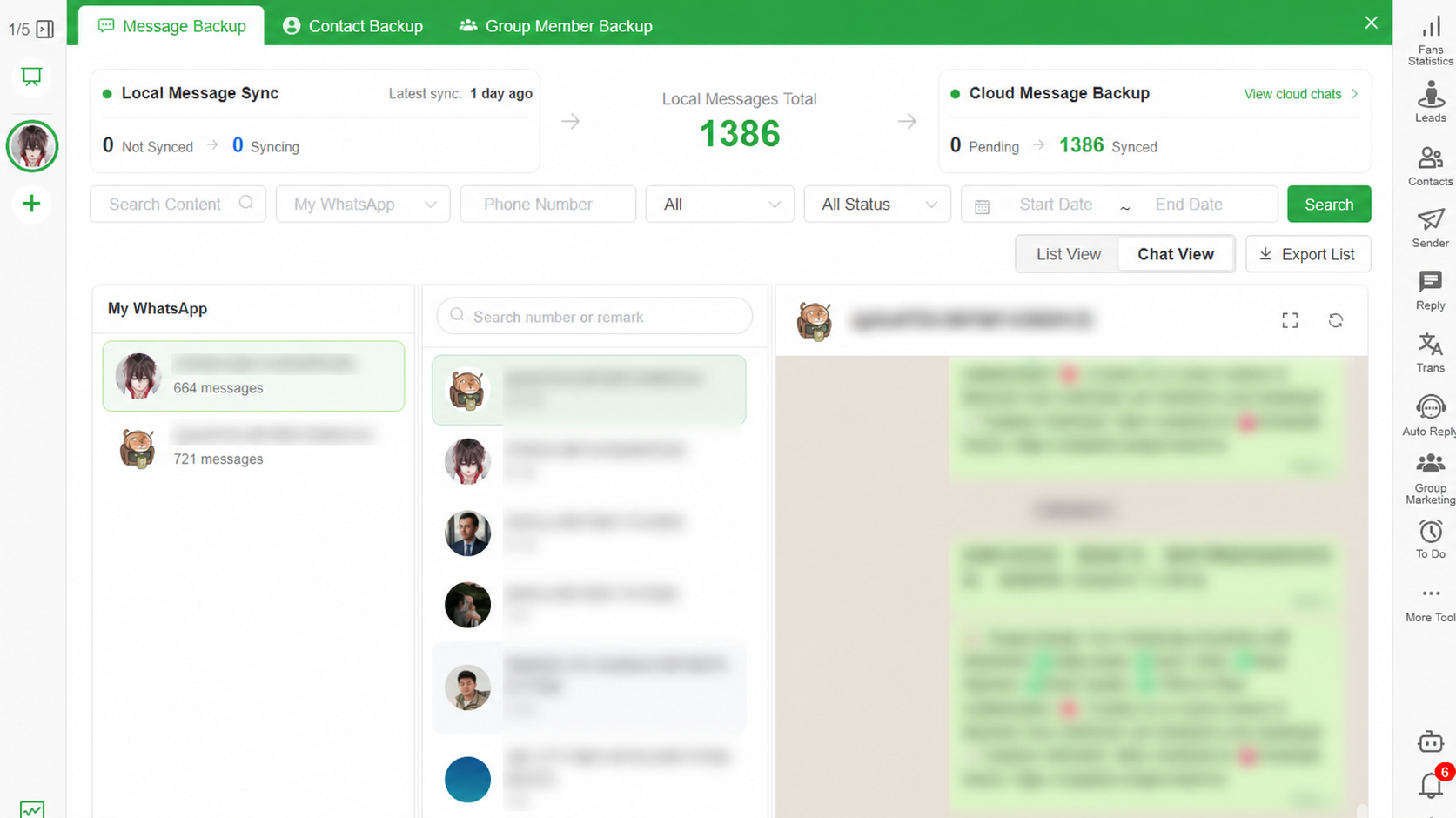
Bakvio is not a cloud-restore replacement. It does not import HTML, Excel or CSV files into WhatsApp.
Android, iPhone, Windows and macOS boundaries
Android
Use WhatsApp’s supported Google Drive or device-based workflow when restoration is the goal. Copying an encrypted Android database file to a computer does not make it a readable local archive.
iPhone
Use WhatsApp’s supported iCloud workflow when restoration is the goal. An iCloud backup and a readable computer archive solve different tasks.
Windows and macOS
Bakvio runs as a desktop client on supported Windows and macOS computers. The computer is where completed local records are searched, viewed and exported.
Moving between platforms
Do not assume a backup created for one platform can be restored on another. Use WhatsApp’s current transfer instructions for migration. Build a separate local archive only when you need independent access to records outside the app.
Decision guide: which should you choose?
Choose Google Drive or iCloud when
- You need to recover chats inside WhatsApp.
- You are reinstalling the app or replacing a phone.
- You can maintain the required cloud and phone-number access.
Choose a Bakvio local archive when
- You need to read records directly on a computer.
- You need keyword, account, contact or date-based retrieval.
- You need HTML, Excel, CSV or supported media exports.
- You need authorized contact or group-member records.
- You want completed records available without completing a phone restore.
Choose both when
- WhatsApp is business-critical.
- You need both disaster recovery and operational retrieval.
- Customer history must survive device changes or staff handovers.
- A single recovery method would create too much risk.
Read WhatsApp Backup vs Export for a complete comparison of restore, transfer, export and local archive workflows.
For the full desktop process, see WhatsApp Chat Backup to PC Without Cloud Storage.
Privacy is an operating model, not a location label
Cloud and local storage have different responsibilities. With a cloud backup, review account security, encryption options and recovery access. With a local archive, protect the device and every exported file.
For Bakvio local storage:
- Enable disk encryption on the computer.
- Use separate operating-system accounts.
- Limit access to backup and export folders.
- Avoid personal or unapproved synchronized directories.
- Maintain a protected second copy if continuity requires it.
- Set a retention period and remove expired records.
- Test whether another authorized person can find a required record.
Local storage gives direct control; it does not remove the need for security administration.
What happens if the WhatsApp account becomes inaccessible?
A cloud restore still depends on the supported recovery requirements. Bakvio can continue showing and exporting data that was successfully saved locally before access was lost. It cannot fetch new messages, missing media or anything that was never backed up.
This is why timing matters. Verify the archive while the account and important media remain accessible.
Storage and media planning
Media usually consumes more space than text. Before choosing any workflow:
- Estimate the size of photos, videos, audio and documents.
- Decide whether videos are necessary for restoration or archiving.
- Confirm free space in the cloud account and on the computer.
- Test representative older attachments.
- Document where secondary copies are stored.
Do not describe a backup as complete only because a total count appears. Open the records that matter.
Important limitations
This workflow overview was reviewed on 08/05/2026. Product labels and availability may change.
- Bakvio saves only data accessible during the backup process.
- It cannot restore records into WhatsApp.
- It cannot guarantee availability of historical media.
- Losing access before backup prevents Bakvio from retrieving missing data.
- Local storage is not automatically more secure than cloud storage.
- Cloud product behavior may change; verify current WhatsApp, Google and Apple instructions.
Frequently asked questions
Can I use Bakvio together with Google Drive or iCloud?
Yes. Keep the official backup for WhatsApp restoration and use Bakvio for searchable local access and export. They serve different purposes.
Can I view a Google Drive WhatsApp backup on my PC?
Not as a normal readable conversation archive. It is intended for supported restoration. Bakvio provides a computer interface for data already saved in its local Backup Center.
Can I view an iCloud WhatsApp backup on Windows?
An iCloud WhatsApp backup is not normally a browsable message archive on Windows. Use a supported restore process, or create a local archive in advance when computer access is required.
Does Bakvio upload backups to the cloud?
The core workflow described here stores completed Bakvio backups on the computer. An export can move elsewhere only if the user or another configured system copies or synchronizes it.
Is local backup better for privacy?
It offers direct storage control and reduces reliance on a cloud restore workflow, but privacy still depends on disk encryption, account security, access permissions and retention practices.
What if cloud storage is full?
Review the cloud provider’s storage settings and WhatsApp media options. A Bakvio local archive uses computer storage, but you must also ensure sufficient disk space there.
Where is the Bakvio backup stored?
Completed data is stored on the computer running Bakvio. Exported files are saved to the location chosen by the user.
Build two layers of protection
An official restore backup protects continuity inside WhatsApp. A verified local archive protects the ability to retrieve and use business records outside the phone. For important accounts, keeping both is often the more practical design.
Download Bakvio to create a searchable local archive of accessible WhatsApp chats, media, contacts and authorized group-member records.
How to Back Up WhatsApp Business Chats Before an Employee Leaves
A three-stage employee handover process for preserving customer context without monitoring personal accounts.
WhatsApp Backup vs Export: What Is the Difference?
A practical comparison of restore backups, native chat export, phone transfer and searchable local archives.